How to move some of the existing devices to a new Home in the eufySecurity app v4.0?
Modified on: Tue, 2 Dec, 2025 at 9:05 AM
Compatible with:
Outdoor Cam Pro (Solo OutdoorCam C24), Indoor Cam 2K Pan & Tilt (Solo IndoorCam P24), Indoor Cam 2K (Solo IndoorCam C24), SoloCam E40, SoloCam L40, SoloCam S230, eufyCam 2 Pro, eufyCam 2C Pro, eufyCam 2, eufyCam 2C, eufyCam, eufyCam Solar Panel, Backup Battery for HomeBase 2, SmartDrop, Video Doorbell 2K (Wired), Video Doorbell 2K (Battery-Powered), eufy Security Video Doorbell 1080p (Battery-Powered), Keypad, Indoor Cam Mini 2K, Entry Sensor, Motion Sensor, 5-Piece Home Alarm Kit, Video Doorbell Dual 2K (Battery-Powered), Floodlight Cam 2 Pro, Floodlight Cam 1080p, Floodlight Cam E 2K
There are 2 methods to move some of the existing devices to a new Home in the
eufySecurity app v4.0.
1. Create a new Home and then move the existing devices from the existing Home to the new Home.
- Tap “Manage Home” > Add New Home > Name the new Home
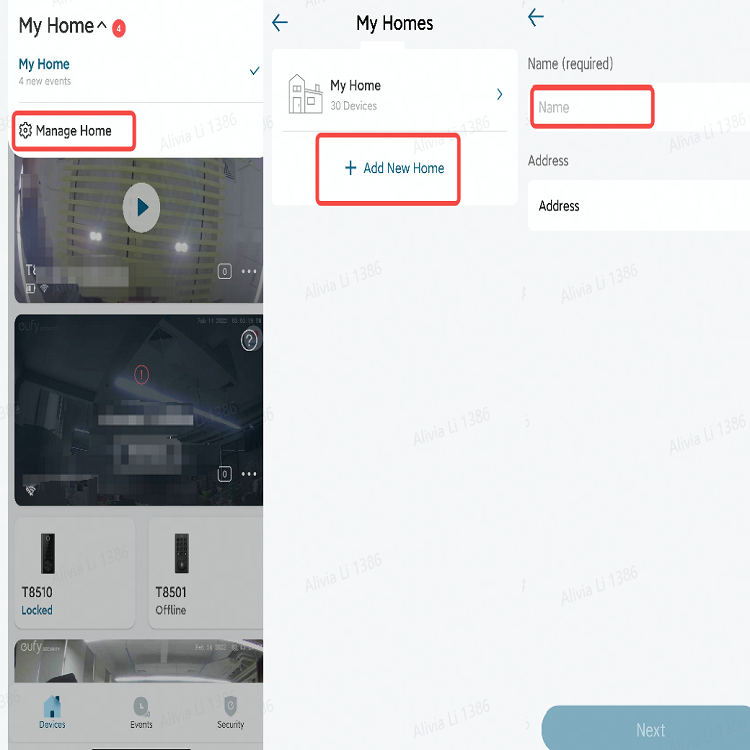
- Tap the existing Home > All Devices > “⇆” icon > choose the new Home

2. Move the existing devices from the existing Home to the new Home directly.
- Tap the existing Home > All Devices > “⇆” icon > Add New Home > Name the new Home > choose the new Home

Was this article helpful?
That’s Great!
Thank you for your feedback
Sorry! We couldn't be helpful
Thank you for your feedback
Feedback sent
We appreciate your effort and will try to fix the article